
Configuring the 6 Core Alert Rules & 2-Layer Delay Detection
Fine-tune Predictive Stock-Out, Dead Stock, Fulfillment Delay (Layer 1), Shipping Delay across 3,500+ Carriers (Layer 2), Fraud Risk, and Unusual Order Volume detection.
Overview: The 6 Detection Rules & 2-Layer Delay Engine
Tada Alerts combines real-time Shopify webhooks (orders/create, orders/updated, orders/fulfilled, inventory_levels/update) with periodic BullMQ background evaluations to detect store issues before they impact customers.
Open Apps → TadaAlerts → Alert rules and make sure the Triggers & thresholds tab is selected. Whenever you modify a checkbox or threshold, the native Shopify Contextual Save Bar appears at the top of the screen so you can save or discard your edits safely.
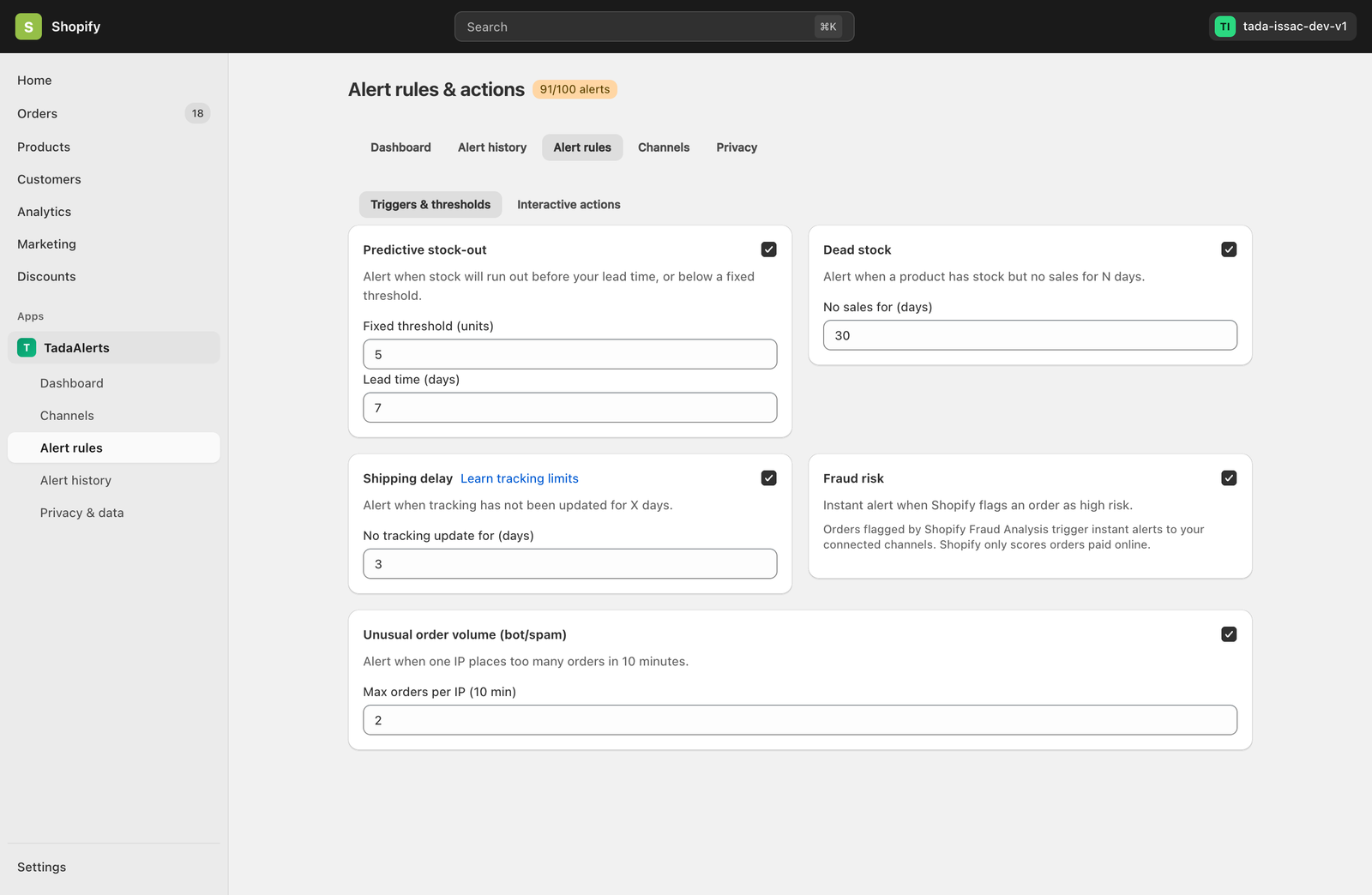
Detailed Breakdown of All 6 Rules
| Rule Name | Parameters | How Detection Works |
|---|---|---|
1. Predictive stock-outPREDICTIVE_STOCKOUT |
Fixed threshold (units) (default: 5)Lead time (days) (default: 7) |
Calculates daily sales velocity per variant over the trailing window. Fires a warning when remaining stock falls below your fixed unit floor or when projected days-of-cover drops below your supplier lead time. |
2. Dead stockDEAD_STOCK |
No sales for (days) (default: 30) |
Identifies inventory-carrying variants with positive on-hand stock that have recorded zero sales over the configured number of days, helping merchandising teams run timely clearance promos. |
3. Fulfillment delay (Layer 1)FULFILLMENT_DELAY |
Paid but unfulfilled for (hours) (default: 48) |
Audits paid Shopify orders and fires when an order remains unfulfilled past X hours (deduplicated once per order until fulfilled). Catches DSers/AutoDS sync drops or warehouse backlog before a tracking number exists — consumes 0 tracking quota and is unlimited on all plans. |
4. Shipping delay (Layer 2)SHIPPING_DELAY |
No tracking update for (days) (default: 3) |
Monitors fulfilled orders with tracking numbers across 3,500+ global carriers every 6 hours on all plans. Fires when an in-transit parcel has no carrier checkpoint scan for X days. |
5. Fraud riskFRAUD_RISK |
Boolean toggle (Enabled / Disabled) | Triggers an instant critical alert the moment Shopify Fraud Analysis flags a paid online order as High Risk, attaching one-tap Hold Order and Tag Staff buttons in chat. |
6. Unusual order volume (bot/spam)VOLUME_ANOMALY |
Max orders per IP (10 min) (default: 5) |
Tracks sliding 10-minute order velocity per client IP address. Immediately alerts your team when card-testing bots, flash-sale scalpers, or duplicate checkout loops exceed the threshold. |
Understanding 2-Layer Delay Detection & Smart Tracking Quota Gate
Inside the Shipping delay card, click Learn tracking limits to open the carrier tracking coverage reference modal.
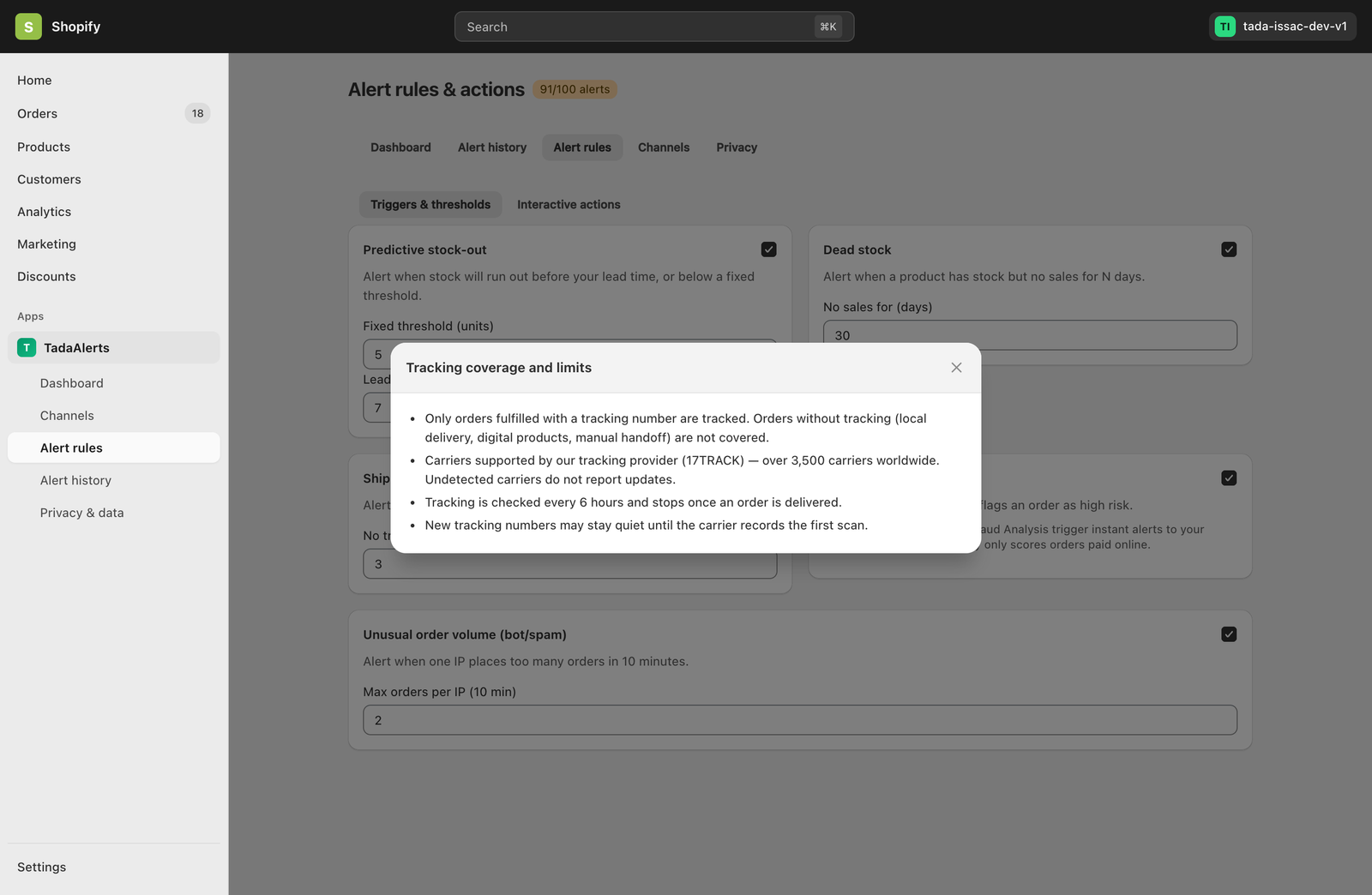
- Smart Registration Gate: Tada Alerts only registers tracking numbers for checkpoint scanning when your Shipping delay rule is enabled and your store is within its monthly tracked shipments cap (20 shipments/mo on Free, 300 shipments/mo on Pro). Stores that only enable Stock, Fraud, or Fulfillment Delay rules use zero tracking quota.
- Only Accepted Registrations Count: Only first-time tracking numbers accepted by our carrier network deduct 1 shipment from your monthly allowance. Duplicate tracking numbers or unrecognized carriers rejected as invalid cost 0 quota.
- Continuous Tracking Until Delivered: If your store reaches its monthly tracked shipments cap, new tracking numbers pause registration until the next billing cycle, but all previously registered parcels continue to be scanned all the way to
Delivered— and Layer 1 Fulfillment delay continues running without limits.