Getting Started & 4-Step Setup Guide
Install Tada Alerts from Shopify Admin, complete the 4-step interactive onboarding checklist, and run your initial store scan in under 3 minutes.
Overview: 100% Embedded Inside Shopify Admin
Tada Alerts is engineered to run directly inside your Shopify Admin under Apps → TadaAlerts. There are no external logins, separate passwords, or third-party dashboards to manage — authentication happens automatically via Shopify App Bridge session tokens.
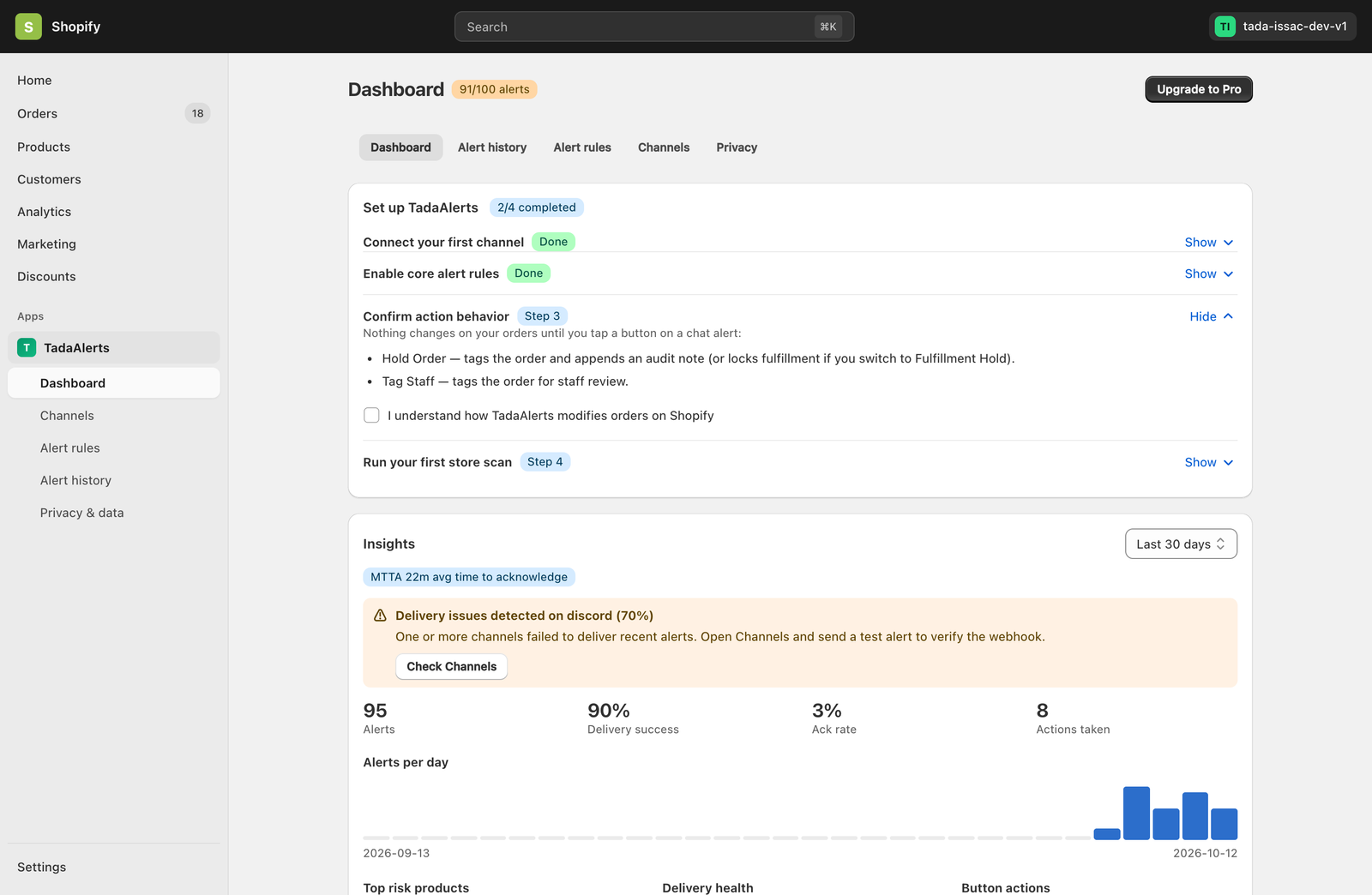
When you open Tada Alerts for the first time, the Set up TadaAlerts onboarding card appears at the top of your Dashboard with a guided 4-step checklist.
The 4 Onboarding Steps Explained
Connect your first channel & send a test alert
Click Connect a channel to open the Channels tab. You can connect Telegram (via @TadaAlertsBot), Slack, Discord, or a Custom Webhook. Once added, click the Test button next to your channel to verify delivery. When the test message arrives in your chat, Step 1 automatically marks itself as Done.
Enable core alert rules
With one click on Enable recommended rules, Tada Alerts activates sensible default thresholds across your core operational rules:
- Predictive stock-out: Fixed threshold of
5 unitsand lead time of7 days. - Fulfillment delay (Layer 1 — Unlimited): Alerts when a paid order remains unfulfilled after
48 hours(0 tracking quota cost). - Shipping delay (Layer 2 — 3,500+ Carriers): Alerts when a fulfilled order has no carrier tracking update for
3 days. - Fraud risk: Instant alert when Shopify Fraud Analysis flags an online order as High Risk.
- Unusual order volume (bot/spam): Alerts when a single IP places more than
5 orderswithin 10 minutes.
Confirm action behavior
Because Tada Alerts includes interactive chat buttons (Hold Order and Tag Staff), Step 3 ensures you understand how tapping a button in chat interacts with your Shopify orders:
- Nothing ever changes on your orders automatically — modifications only happen when a team member explicitly taps an action button on an alert.
- Check “I understand how TadaAlerts modifies orders on Shopify” and click Confirm to complete Step 3.
Run your first store scan
Once Steps 1 and 3 are complete, click Scan my store now. Tada Alerts immediately audits your current Shopify catalog and recent orders to surface existing low-stock variants, dead stock items, unfulfilled orders, or stalled shipments without waiting for the next scheduled background job.