One-Tap Chat Actions & Native Fulfillment Hold
Hold suspicious orders via Shopify’s GraphQL FulfillmentOrderHold API, tag staff for review, and append non-destructive audit notes directly from chat.
Overview: Act on Alerts Without Leaving Chat
When a critical order or inventory alert arrives in Telegram, Slack, or Discord, your operations team shouldn’t have to switch devices, log into Shopify Admin, search for the order number, and manually place a hold before the warehouse prints the packing slip.
Tada Alerts attaches interactive action buttons directly below each alert message: Hold Order, Tag Staff, and Ack (Acknowledge). You can customize the exact behavior of these buttons under Alert rules → Interactive actions.
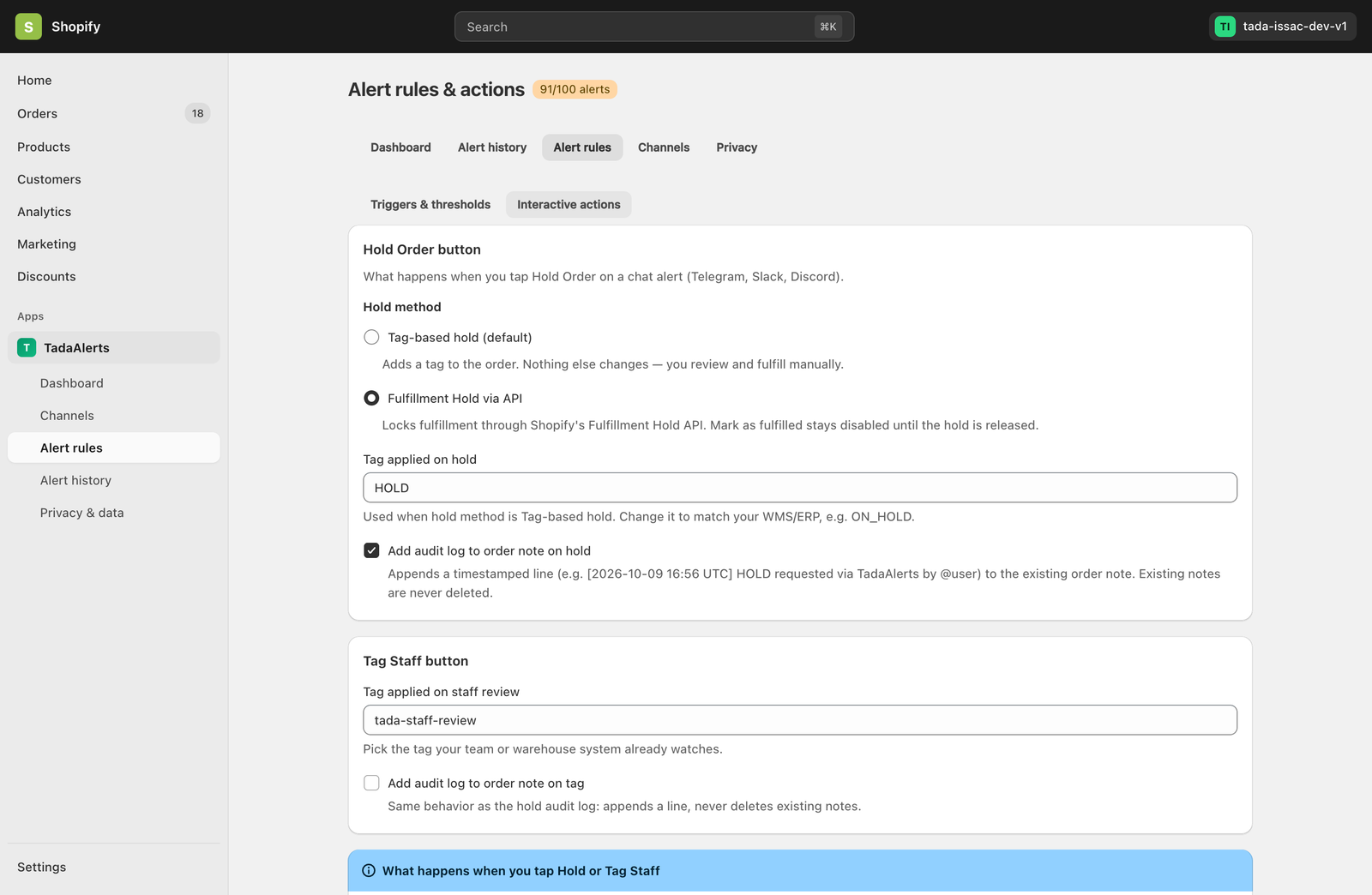
Choosing Your Hold Order Method
In the Hold Order button card, you can choose between two hold mechanisms depending on how your warehouse or 3PL processes orders:
Tag-based hold (default)
Appends your custom hold tag (default: HOLD, customizable to match your WMS/ERP such as ON_HOLD or FRAUD_REVIEW) to the Shopify order via the GraphQL tagsAdd mutation. Nothing else on the order is locked — ideal if your fulfillment team filters orders by tag or uses Shopify Flow rules triggered by tags.
Fulfillment Hold via API (Recommended for 3PL / Automated Warehouses)
Calls Shopify’s native GraphQL fulfillmentOrderHold mutation on all open fulfillment orders associated with the order, plus applies your hold tag. This changes the order status in Shopify Admin to On hold and disables the Mark as fulfilled button (and blocks 3PL fulfillment sync) until a staff member manually releases the hold in Shopify Admin.
Tag Staff Button & Non-Destructive Order Audit Logs
- Tag applied on staff review: When a team member taps Tag Staff in chat, Tada Alerts applies your configured tag (default:
tada-staff-review) so senior support or fraud analysts can filter flagged orders in one click. - Non-Destructive Audit Notes: Enabling “Add audit log to order note on hold” or “Add audit log to order note on tag” appends a timestamped audit line (for example:
[2026-10-09 16:56 UTC] HOLD requested via TadaAlerts by @user) to the existing Shopify order note. Existing order notes are never overwritten or deleted. - Acknowledge (Ack) & MTTA Tracking: Tapping Ack marks the alert as acknowledged, records which team member handled it, and calculates your store’s Mean Time to Acknowledge (MTTA) metric on the Dashboard.